> ## Documentation Index
> Fetch the complete documentation index at: https://docs.get-clara.tech/llms.txt
> Use this file to discover all available pages before exploring further.

# 製品データを Twenty に取り込む

> データウェアハウスの製品カタログデータをスケジュールに基づいてCRMに同期します。

このパターンを使用して、データウェアハウス（例: Snowflake、BigQuery、PostgreSQL）の製品データとTwentyの同期を維持します。

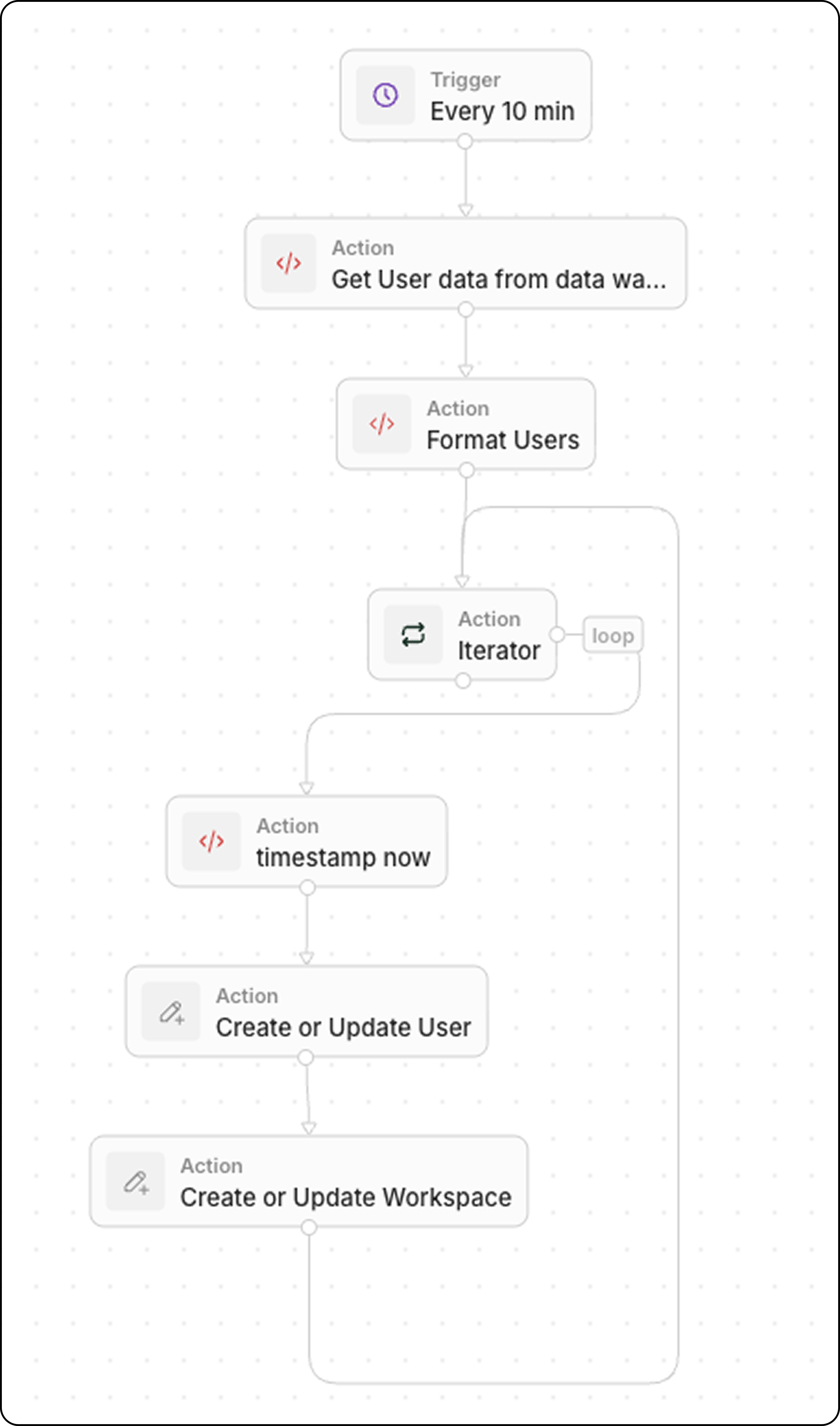
## ワークフローの構成

1. **トリガー**: スケジュール実行
2. **Code**: データウェアハウスをクエリする
3. **Code**（任意）：データを配列として整形
4. **Iterator**: 各製品をループ処理する
5. **Upsert Record**: Twentyで作成または更新
<img src="https://mintcdn.com/clara-1b8b12e1/sHXKG8rWt8DAIbvx/images/user-guide/workflows/create_users_workflow.png?fit=max&auto=format&n=sHXKG8rWt8DAIbvx&q=85&s=7af72cfbb3206228a84ea9bb88838b0d" style={{width:'100%'}} width="4550" height="7720" data-path="images/user-guide/workflows/create_users_workflow.png" />

## ステップ 1: トリガーをスケジュールする

データの鮮度要件に合わせた頻度でワークフローを実行するよう設定します:

* ほぼリアルタイム同期用に5分ごと
* 重要度の低いデータには1時間ごと
* バッチ更新には毎日

## ステップ 2: データウェアハウスをクエリする

直近のデータを取得するために「**Code**」アクションを追加します:

```javascript theme={null}
export const main = async () => {
  const intervalMinutes = 10; // Match your schedule frequency
  const cutoffTime = new Date(Date.now() - intervalMinutes * 60 * 1000).toISOString();

  // Replace with your actual data warehouse connection
  const response = await fetch("https://your-warehouse-api.com/query", {
    method: "POST",
    headers: {
      "Authorization": "Bearer YOUR_API_KEY",
      "Content-Type": "application/json"
    },
    body: JSON.stringify({
      query: `
        SELECT id, name, sku, price, stock_quantity, updated_at
        FROM products
        WHERE updated_at >= '${cutoffTime}'
      `
    })
  });

  const data = await response.json();
  return { products: data.results };
};
```

<Tip>
  `updated_at >= last X minutes` でフィルタリングして、最近変更されたレコードのみを取得します。 これにより同期が効率的になります。
</Tip>

## ステップ 3: データを整形（任意）

ウェアハウスが変換を要する形式でデータを返す場合は、別の「**Code**」アクションを追加します。 一般的な変換には、型変換、フィールド名の変更、データのクリーンアップなどがあります。

### 例: 真偽値およびステータスフィールドを含むユーザーデータ

```javascript theme={null}
export const main = async (params: {
  users: any;
}): Promise<object> => {
  const { users } = params;
  const usersFormatted = typeof users === "string" ? JSON.parse(users) : users;

  // Convert string "true"/"false" to actual booleans
  const toBool = (v: any) => v === true || v === "true";

  return {
    users: usersFormatted.map((user) => ({
      ...user,
      activityStatus: String(user.activityStatus).toUpperCase(),
      isActiveLast30d: toBool(user.isActiveLast30d),
      isActiveLast7d: toBool(user.isActiveLast7d),
      isActiveLast24h: toBool(user.isActiveLast24h),
      isTwenty: toBool(user.isTwenty),
    })),
  };
};
```

### 例: 型変換を含む製品データ

```javascript theme={null}
export const main = async (params: { products: any }) => {
  const products = typeof params.products === "string"
    ? JSON.parse(params.products)
    : params.products;

  return {
    products: products.map(product => ({
      externalId: product.id,
      name: product.name,
      sku: product.sku,
      price: parseFloat(product.price),        // String → Number
      stockQuantity: parseInt(product.stock_quantity),
      isActive: product.status === "active"    // String → Boolean
    }))
  };
};
```

### 例: 日付および通貨の整形

```javascript theme={null}
export const main = async (params: { deals: any }) => {
  const deals = typeof params.deals === "string"
    ? JSON.parse(params.deals)
    : params.deals;

  return {
    deals: deals.map(deal => ({
      ...deal,
      // Convert Unix timestamp to ISO date
      closedAt: deal.closed_timestamp
        ? new Date(deal.closed_timestamp * 1000).toISOString()
        : null,
      // Ensure amount is a number (remove currency symbols)
      amount: parseFloat(String(deal.amount).replace(/[^0-9.-]/g, "")),
      // Normalize stage names
      stage: deal.stage?.toLowerCase().replace(/_/g, " ")
    }))
  };
};
```

### 一般的な変換

| ソース形式                | ターゲット形式          | コード                                      |
| -------------------- | ---------------- | ---------------------------------------- |
| `"true"` / `"false"` | `true` / `false` | `v === true \|\| v === "true"`           |
| `"123.45"`           | `123.45`         | `parseFloat(value)`                      |
| `"active"`           | `"ACTIVE"`       | `value.toUpperCase()`                    |
| `1704067200` (Unix)  | ISO 日付           | `new Date(v * 1000).toISOString()`       |
| `"$1,234.56"`        | `1234.56`        | `parseFloat(v.replace(/[^0-9.-]/g, ""))` |
| `null` / `undefined` | `""`             | `value \|\| ""`                          |

## ステップ 4: 製品をループ処理する

「**Iterator**」アクションを追加します:

* 入力: `{{code.products}}`

配列内の各製品をループ処理します。

## ステップ 5: 各レコードをアップサートする

Iterator 内で「**Upsert Record**」アクションを追加します:

| 設定         | 値                         |
| ---------- | ------------------------- |
| **オブジェクト** | カスタムの Product オブジェクト      |
| **一致条件**   | 外部IDまたはSKU（一意の識別子）        |
| **名前**     | `{{iterator.item.name}}`  |
| **SKU**    | `{{iterator.item.sku}}`   |
| **価格**     | `{{iterator.item.price}}` |

<Tip>
  作成と更新で分岐を作る代わりに、**Upsert**（更新または作成）を使用します。 その方が構築が速く、デバッグも容易です。
</Tip>

## ユースケース例

| ソース               | データ                 |
| ----------------- | ------------------- |
| **ERP システム**      | 製品カタログ、価格設定、在庫      |
| **Eコマースプラットフォーム** | 受注、顧客、製品更新          |
| **データウェアハウス**     | 集計メトリクス、エンリッチされたデータ |
| **在庫管理システム**      | 在庫水準、再発注アラート        |

## 関連

* [ワークフローのトリガー](/l/ja/user-guide/workflows/capabilities/workflow-triggers)
* [ワークフローのアクション](/l/ja/user-guide/workflows/capabilities/workflow-actions)
* [Code アクションで配列を扱う](/l/ja/user-guide/workflows/how-tos/advanced-configurations/handle-arrays-in-code-actions)
