> ## Documentation Index
> Fetch the complete documentation index at: https://docs.get-clara.tech/llms.txt
> Use this file to discover all available pages before exploring further.
# Twenty로 제품 데이터 가져오기
> 일정에 따라 데이터 웨어하우스의 제품 카탈로그 데이터를 CRM으로 동기화하세요.
이 패턴을 사용하여 데이터 웨어하우스(예: Snowflake, BigQuery, PostgreSQL)의 제품 데이터와 Twenty를 동기화 상태로 유지하세요.
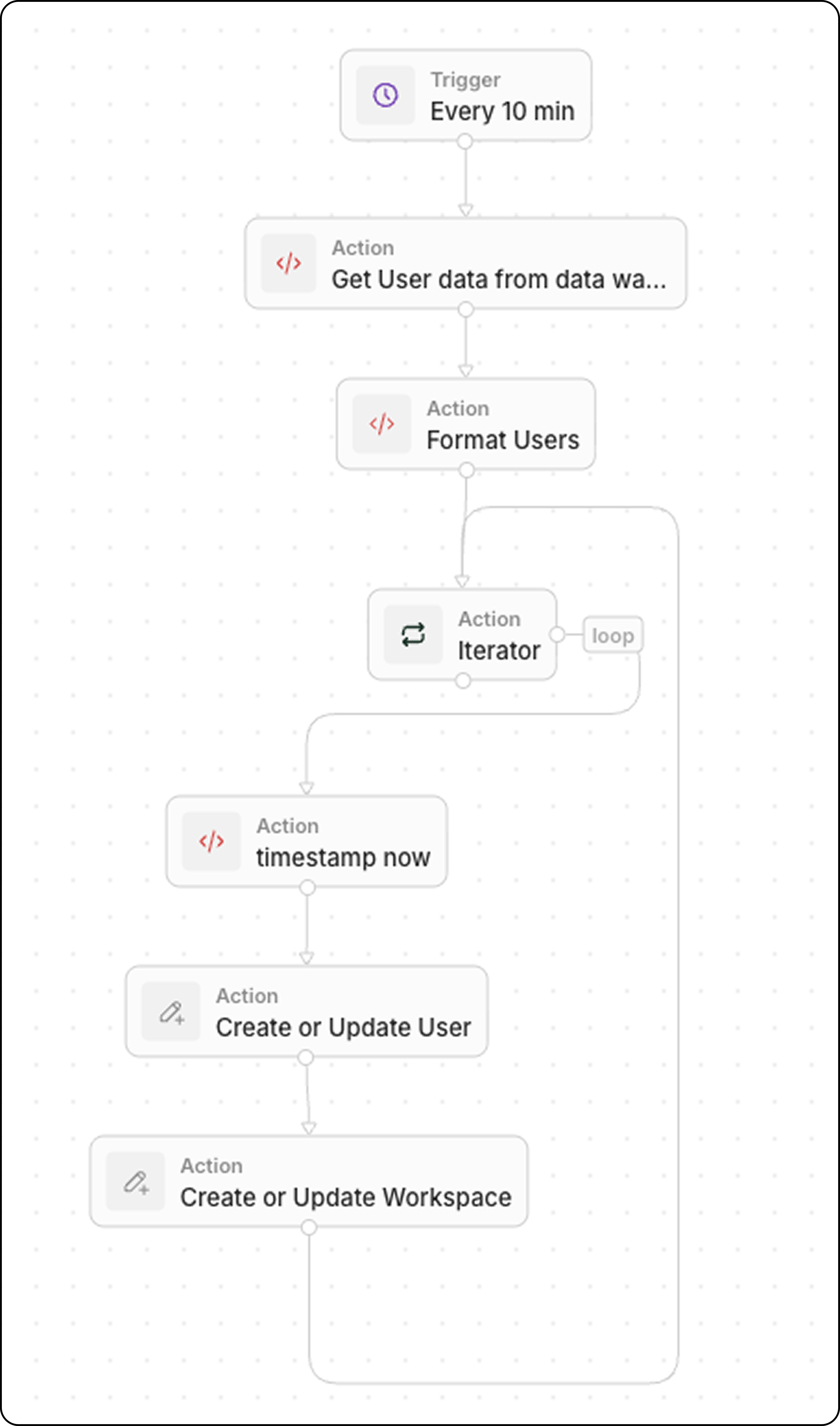
## 워크플로우 구조
1. **트리거**: 일정에 따라
2. **코드**: 데이터 웨어하우스에 질의
3. **코드**(선택): 데이터를 배열로 형식 지정
4. **Iterator**: 각 제품을 순회
5. **레코드 업서트**: Twenty에서 생성 또는 업데이트
## 단계 1: 트리거 일정 설정
데이터 최신성 요구에 맞는 빈도로 워크플로우가 실행되도록 설정하세요:
* 거의 실시간 동기화를 위해 5분마다
* 중요도가 낮은 데이터의 경우 매시간
* 배치 업데이트의 경우 매일
## 단계 2: 데이터 웨어하우스 질의
최근 데이터를 가져오기 위해 **코드** 액션을 추가합니다:
```javascript theme={null}
export const main = async () => {
const intervalMinutes = 10; // Match your schedule frequency
const cutoffTime = new Date(Date.now() - intervalMinutes * 60 * 1000).toISOString();
// Replace with your actual data warehouse connection
const response = await fetch("https://your-warehouse-api.com/query", {
method: "POST",
headers: {
"Authorization": "Bearer YOUR_API_KEY",
"Content-Type": "application/json"
},
body: JSON.stringify({
query: `
SELECT id, name, sku, price, stock_quantity, updated_at
FROM products
WHERE updated_at >= '${cutoffTime}'
`
})
});
const data = await response.json();
return { products: data.results };
};
```
`updated_at >= last X minutes`로 필터링하여 최근에 변경된 레코드만 가져옵니다. 동기화를 효율적으로 유지할 수 있습니다.
## 단계 3: 데이터 형식 지정(선택)
웨어하우스가 변환이 필요한 형식으로 데이터를 반환하는 경우, **코드** 액션을 하나 더 추가하세요. 일반적인 변환에는 타입 변환, 필드 이름 변경, 데이터 정리가 포함됩니다.
### 예시: 불리언 및 상태 필드를 포함한 사용자 데이터
```javascript theme={null}
export const main = async (params: {
users: any;
}): Promise
 ## 단계 1: 트리거 일정 설정
데이터 최신성 요구에 맞는 빈도로 워크플로우가 실행되도록 설정하세요:
* 거의 실시간 동기화를 위해 5분마다
* 중요도가 낮은 데이터의 경우 매시간
* 배치 업데이트의 경우 매일
## 단계 2: 데이터 웨어하우스 질의
최근 데이터를 가져오기 위해 **코드** 액션을 추가합니다:
```javascript theme={null}
export const main = async () => {
const intervalMinutes = 10; // Match your schedule frequency
const cutoffTime = new Date(Date.now() - intervalMinutes * 60 * 1000).toISOString();
// Replace with your actual data warehouse connection
const response = await fetch("https://your-warehouse-api.com/query", {
method: "POST",
headers: {
"Authorization": "Bearer YOUR_API_KEY",
"Content-Type": "application/json"
},
body: JSON.stringify({
query: `
SELECT id, name, sku, price, stock_quantity, updated_at
FROM products
WHERE updated_at >= '${cutoffTime}'
`
})
});
const data = await response.json();
return { products: data.results };
};
```
## 단계 1: 트리거 일정 설정
데이터 최신성 요구에 맞는 빈도로 워크플로우가 실행되도록 설정하세요:
* 거의 실시간 동기화를 위해 5분마다
* 중요도가 낮은 데이터의 경우 매시간
* 배치 업데이트의 경우 매일
## 단계 2: 데이터 웨어하우스 질의
최근 데이터를 가져오기 위해 **코드** 액션을 추가합니다:
```javascript theme={null}
export const main = async () => {
const intervalMinutes = 10; // Match your schedule frequency
const cutoffTime = new Date(Date.now() - intervalMinutes * 60 * 1000).toISOString();
// Replace with your actual data warehouse connection
const response = await fetch("https://your-warehouse-api.com/query", {
method: "POST",
headers: {
"Authorization": "Bearer YOUR_API_KEY",
"Content-Type": "application/json"
},
body: JSON.stringify({
query: `
SELECT id, name, sku, price, stock_quantity, updated_at
FROM products
WHERE updated_at >= '${cutoffTime}'
`
})
});
const data = await response.json();
return { products: data.results };
};
```