> ## Documentation Index
> Fetch the complete documentation index at: https://docs.get-clara.tech/llms.txt
> Use this file to discover all available pages before exploring further.
# Declanșatoare pentru fluxuri de lucru
> Learn about the different triggers that start your workflows.
## About Triggers
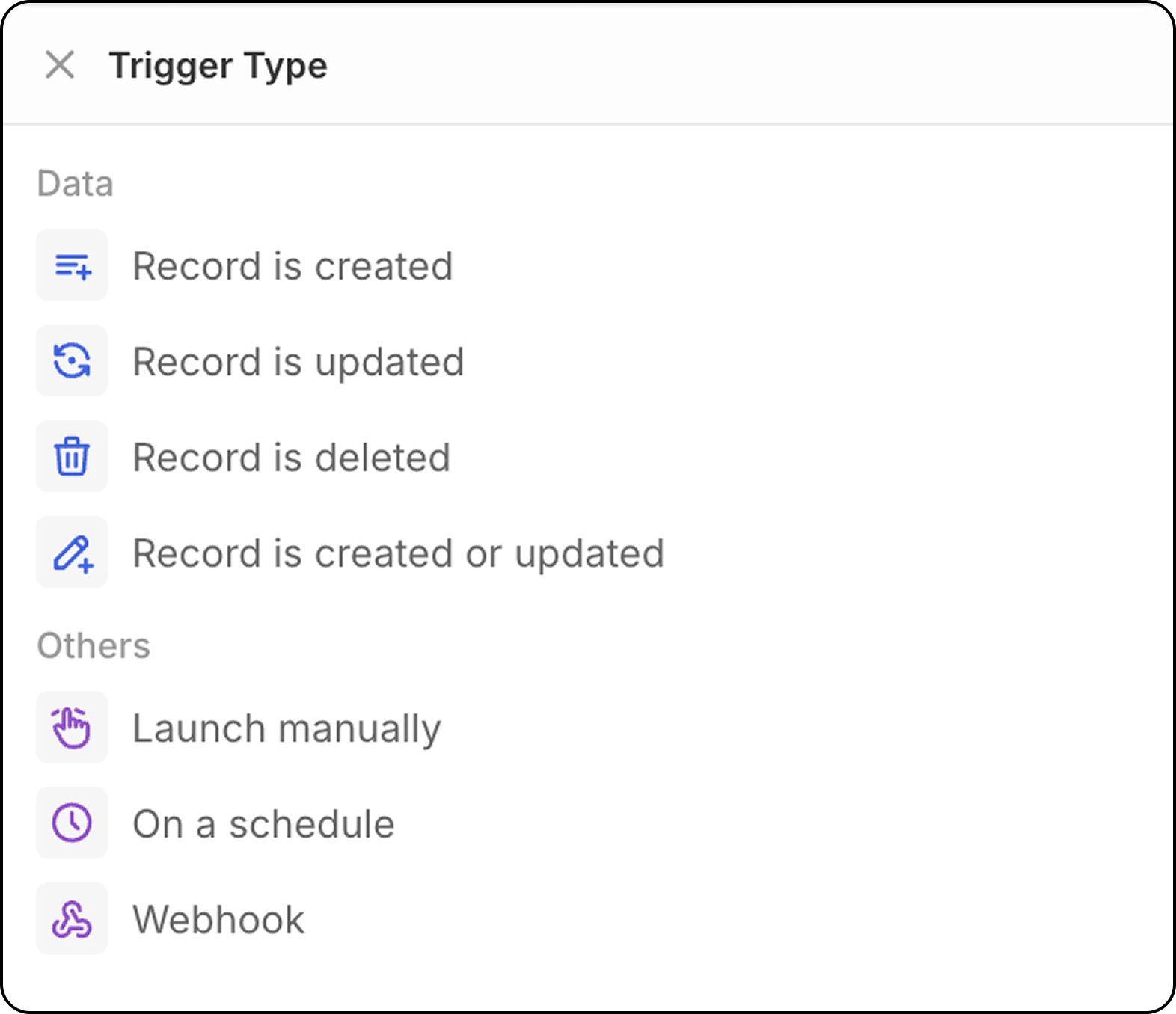
Fluxurile de lucru întotdeauna încep cu un declanșator unic care definește când ar trebui să ruleze automatizarea.
 **Advanced objects are supported!** Beyond standard CRM objects (People, Companies, Opportunities), you can also trigger workflows and perform actions on:
* Membri ai spațiului de lucru
* Calendar Events
* Messages (Emails)
* Tasks, Notes, and many other system objects
This opens up powerful automations like notifying team members when calendar events are created, or processing incoming emails automatically.
## Înregistrarea este creată
Pornește fluxul de lucru când este creată o nouă înregistrare într-un obiect selectat (Persoane, Companii, Oportunități sau orice obiect personalizat).
**Configurare**: Selectați tipul de obiect pentru a monitoriza noile înregistrări.
* This trigger is great for records created by csv, mailbox and calendar synchronization, API.
* **It is not recommended for records created manually**: with this trigger, workflows start as soon as the record is created. Since Twenty UI offers auto-save on the fly (there is not an edit mode and then a validation to save records), the workflow will be triggered before the user inputs all the fields.
To trigger this workflow on records created manually, it is recommended to use the trigger `Record is created or updated` instead.
## Înregistrarea este actualizată
Pornește fluxul de lucru când se fac modificări într-o înregistrare existentă.
**Configurare**:
* Selectați tipul de obiect
* Specificați opțional care câmpuri să fie monitorizate pentru modificări
## Înregistrarea este actualizată sau creată
Pornește fluxul de lucru când o înregistrare este fie creată, fie actualizată într-un obiect selectat.
**De ce contează acest lucru**: Acest declanșator este deosebit de util deoarece înregistrările create prin metode diferite se comportă diferit:
* **Importuri API/CSV**: Înregistrările sunt create cu toate câmpurile completate imediat
* **Creare manuală**: Înregistrările sunt create mai întâi, apoi câmpurile sunt adăugate în actualizări ulterioare
**Configurare**:
* Selectați tipul de obiect pentru a monitoriza
* Specificați opțional care câmpuri să fie monitorizate pentru modificări
* Fluxul de lucru va fi declanșat atât la crearea inițială, cât și la orice actualizări ulterioare
## Înregistrarea este ștearsă
Pornește fluxul de lucru când o înregistrare este eliminată dintr-un obiect.
**Configurare**: Selectați tipul de obiect pentru a monitoriza ștergerile.
## Manual Trigger
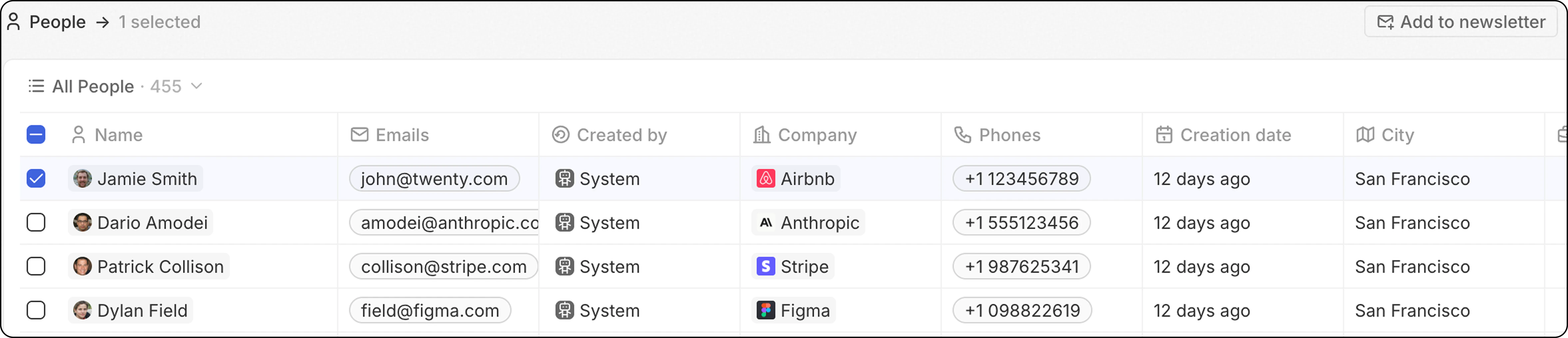
Pornește fluxul de lucru când este declanșat de o acțiune a utilizatorului. This trigger can be accessed through the `Cmd+K` menu or via a custom button that will be displayed in the top navbar after selecting record(s).
**Advanced objects are supported!** Beyond standard CRM objects (People, Companies, Opportunities), you can also trigger workflows and perform actions on:
* Membri ai spațiului de lucru
* Calendar Events
* Messages (Emails)
* Tasks, Notes, and many other system objects
This opens up powerful automations like notifying team members when calendar events are created, or processing incoming emails automatically.
## Înregistrarea este creată
Pornește fluxul de lucru când este creată o nouă înregistrare într-un obiect selectat (Persoane, Companii, Oportunități sau orice obiect personalizat).
**Configurare**: Selectați tipul de obiect pentru a monitoriza noile înregistrări.
* This trigger is great for records created by csv, mailbox and calendar synchronization, API.
* **It is not recommended for records created manually**: with this trigger, workflows start as soon as the record is created. Since Twenty UI offers auto-save on the fly (there is not an edit mode and then a validation to save records), the workflow will be triggered before the user inputs all the fields.
To trigger this workflow on records created manually, it is recommended to use the trigger `Record is created or updated` instead.
## Înregistrarea este actualizată
Pornește fluxul de lucru când se fac modificări într-o înregistrare existentă.
**Configurare**:
* Selectați tipul de obiect
* Specificați opțional care câmpuri să fie monitorizate pentru modificări
## Înregistrarea este actualizată sau creată
Pornește fluxul de lucru când o înregistrare este fie creată, fie actualizată într-un obiect selectat.
**De ce contează acest lucru**: Acest declanșator este deosebit de util deoarece înregistrările create prin metode diferite se comportă diferit:
* **Importuri API/CSV**: Înregistrările sunt create cu toate câmpurile completate imediat
* **Creare manuală**: Înregistrările sunt create mai întâi, apoi câmpurile sunt adăugate în actualizări ulterioare
**Configurare**:
* Selectați tipul de obiect pentru a monitoriza
* Specificați opțional care câmpuri să fie monitorizate pentru modificări
* Fluxul de lucru va fi declanșat atât la crearea inițială, cât și la orice actualizări ulterioare
## Înregistrarea este ștearsă
Pornește fluxul de lucru când o înregistrare este eliminată dintr-un obiect.
**Configurare**: Selectați tipul de obiect pentru a monitoriza ștergerile.
## Manual Trigger
Pornește fluxul de lucru când este declanșat de o acțiune a utilizatorului. This trigger can be accessed through the `Cmd+K` menu or via a custom button that will be displayed in the top navbar after selecting record(s).
 **Configurare disponibilitate**:
Alegeți cum ar trebui ca fluxul de lucru să gestioneze selecția înregistrărilor:
* **Global**: Nu se necesită nicio înregistrare pentru a declanșa acest flux de lucru. The workflow is triggered from the command menu `Cmd + K` anywhere (from any object) and does not use record(s) as input.
* **Single**: Înregistrările selectate vor fi transmise către fluxul dumneavoastră de lucru. Se configurează pentru un obiect dat. Mai multe înregistrări pot fi selectate înainte de a declanșa fluxul de lucru. The workflow will run from beginning to end as many times as there are records selected.
**Soft limit: 100 runs/minute**. Beyond this, workflows remain in "Not Started" status and are processed gradually—either by a background job or when another workflow enters the queue. This means you can select more than 100 records with a Single trigger; execution will just be slower.
* **Bulk**: Înregistrările selectate vor fi transmise către fluxul dumneavoastră de lucru. Se configurează pentru un obiect dat. Mai multe înregistrări pot fi selectate înainte de a declanșa fluxul de lucru. Fluxul de lucru va rula o singură dată, oferind întreaga listă de înregistrări ca intrare. This means the workflow needs to contain an [Iterator action](/l/ro/user-guide/workflows/capabilities/workflow-actions#iterator).
This is more advanced, and best for people who want to optimize the number of workflow runs.
**Configurare disponibilitate**:
Alegeți cum ar trebui ca fluxul de lucru să gestioneze selecția înregistrărilor:
* **Global**: Nu se necesită nicio înregistrare pentru a declanșa acest flux de lucru. The workflow is triggered from the command menu `Cmd + K` anywhere (from any object) and does not use record(s) as input.
* **Single**: Înregistrările selectate vor fi transmise către fluxul dumneavoastră de lucru. Se configurează pentru un obiect dat. Mai multe înregistrări pot fi selectate înainte de a declanșa fluxul de lucru. The workflow will run from beginning to end as many times as there are records selected.
**Soft limit: 100 runs/minute**. Beyond this, workflows remain in "Not Started" status and are processed gradually—either by a background job or when another workflow enters the queue. This means you can select more than 100 records with a Single trigger; execution will just be slower.
* **Bulk**: Înregistrările selectate vor fi transmise către fluxul dumneavoastră de lucru. Se configurează pentru un obiect dat. Mai multe înregistrări pot fi selectate înainte de a declanșa fluxul de lucru. Fluxul de lucru va rula o singură dată, oferind întreaga listă de înregistrări ca intrare. This means the workflow needs to contain an [Iterator action](/l/ro/user-guide/workflows/capabilities/workflow-actions#iterator).
This is more advanced, and best for people who want to optimize the number of workflow runs.
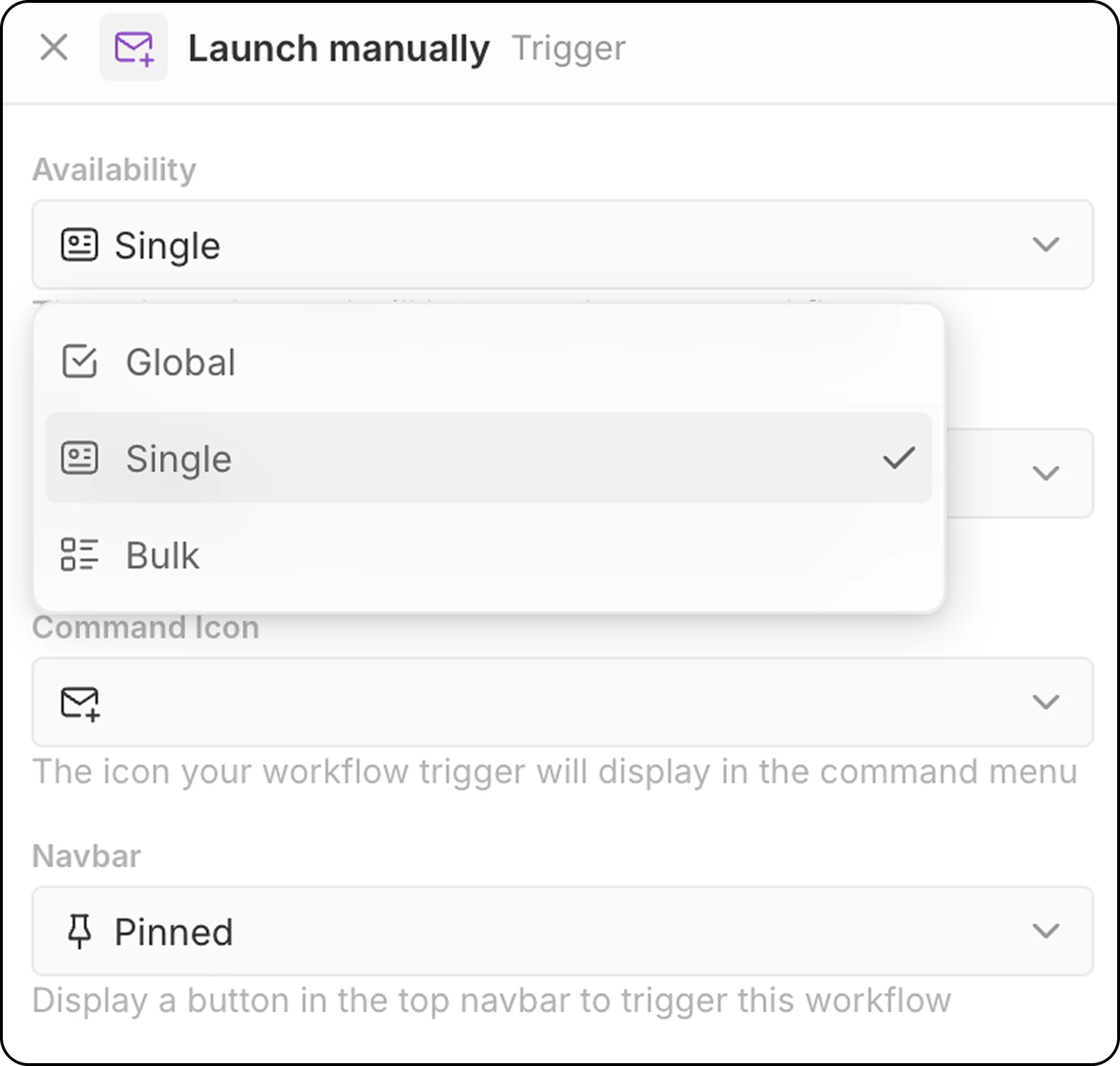 **Configurare suplimentară**:
* Selectați obiectul țintă (pentru modurile Single și Bulk)
* Alegeți o pictogramă de comandă pentru declanșarea fluxului de lucru
* Configurați plasarea în navbar (fixat sau nefixat)
**Metode de acces**:
* `Cmd+K` menu to find and launch manual workflows
* Buton personalizat în navbarul superior (dacă este configurat)
## Time-Based Trigger: On a Schedule
Pornește fluxul de lucru în mod recurent, conform configurării pe care o definiți.
**Configurare**:
* Selectați unitatea de timp (minute, ore, zile)
* Introduceți o valoare sau folosiți expresii cron personalizate pentru programare avansată
**Timezone**: Scheduled workflows run in **UTC**. When setting hours for daily schedules, convert your local time to UTC.
## External Trigger: Webhook
Pornește fluxul de lucru când este primită o cerere GET sau POST de la un serviciu extern.
**Configurare suplimentară**:
* Selectați obiectul țintă (pentru modurile Single și Bulk)
* Alegeți o pictogramă de comandă pentru declanșarea fluxului de lucru
* Configurați plasarea în navbar (fixat sau nefixat)
**Metode de acces**:
* `Cmd+K` menu to find and launch manual workflows
* Buton personalizat în navbarul superior (dacă este configurat)
## Time-Based Trigger: On a Schedule
Pornește fluxul de lucru în mod recurent, conform configurării pe care o definiți.
**Configurare**:
* Selectați unitatea de timp (minute, ore, zile)
* Introduceți o valoare sau folosiți expresii cron personalizate pentru programare avansată
**Timezone**: Scheduled workflows run in **UTC**. When setting hours for daily schedules, convert your local time to UTC.
## External Trigger: Webhook
Pornește fluxul de lucru când este primită o cerere GET sau POST de la un serviciu extern.
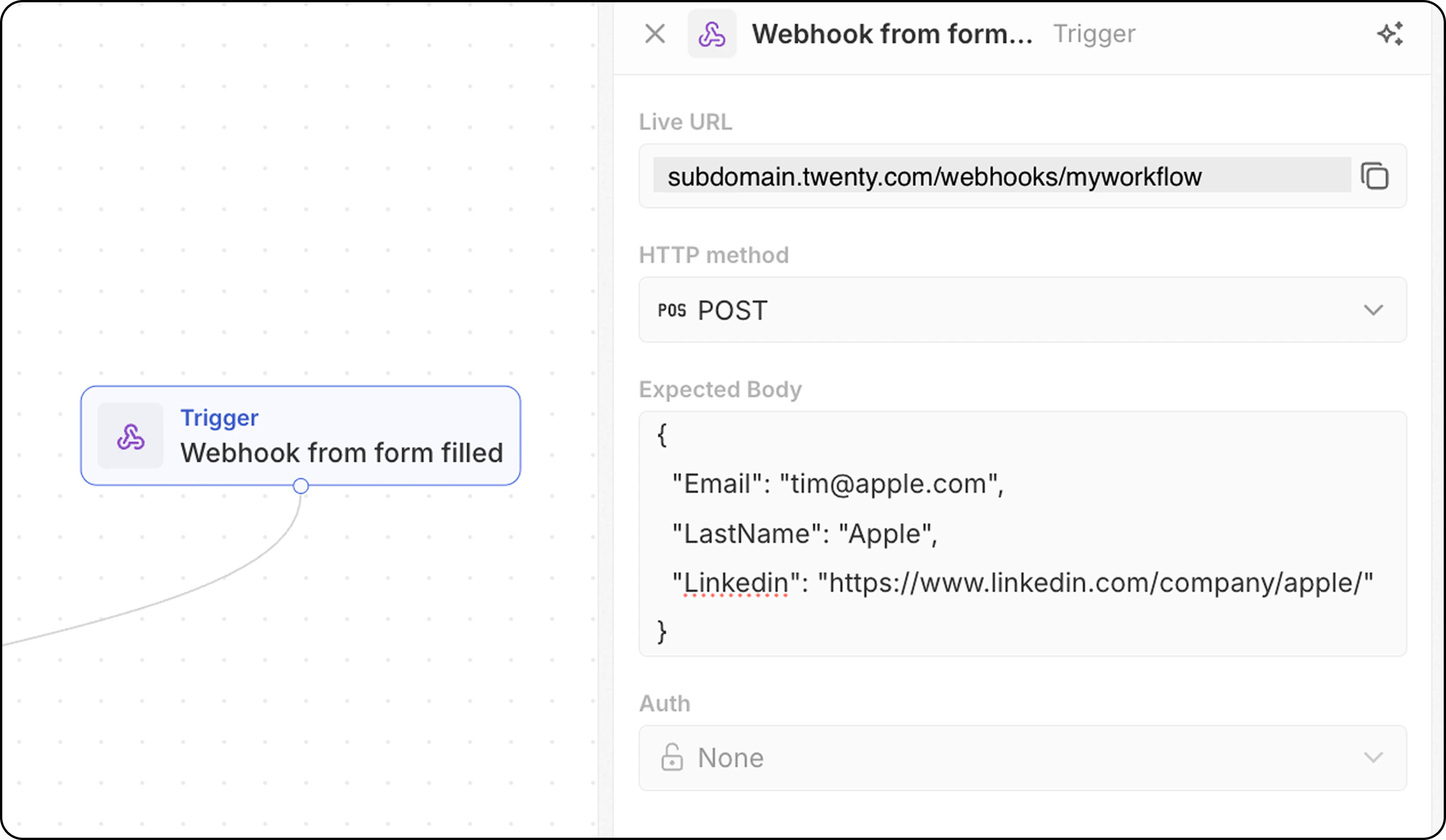 **Configurare**:
* The workflow provides a unique webhook URL—copy this and add it to your external system as the endpoint to call.
* For POST requests, define the expected body structure so Twenty knows what data to expect. Add here the fields you will receive that will be needed below in your workflow.
* Configure authentication (coming soon).
## Choosing the Right Trigger
| Use Case | Recommended Trigger |
| --------------------------- | ----------------------------------------- |
| New leads need processing | Înregistrarea este creată |
| Data changes need sync | Înregistrarea este actualizată |
| Import/manual data handling | Înregistrarea este actualizată sau creată |
| Cleanup after deletion | Înregistrarea este ștearsă |
| User-initiated action | Lansare manuală |
| Recurring reports | Conform unui program |
| External integration | Webhook or On a Schedule |
**Configurare**:
* The workflow provides a unique webhook URL—copy this and add it to your external system as the endpoint to call.
* For POST requests, define the expected body structure so Twenty knows what data to expect. Add here the fields you will receive that will be needed below in your workflow.
* Configure authentication (coming soon).
## Choosing the Right Trigger
| Use Case | Recommended Trigger |
| --------------------------- | ----------------------------------------- |
| New leads need processing | Înregistrarea este creată |
| Data changes need sync | Înregistrarea este actualizată |
| Import/manual data handling | Înregistrarea este actualizată sau creată |
| Cleanup after deletion | Înregistrarea este ștearsă |
| User-initiated action | Lansare manuală |
| Recurring reports | Conform unui program |
| External integration | Webhook or On a Schedule |